Getting Started
Convenient Checkout Gateway (CCG) provides flexible options for integrating payment capabilities into your application.
You can choose between a low code Widget integration or direct API integration for fine grained customization, depending on your business/technical needs.
Capabilities
- (1) Payment
- (2) Wallet
- (3) Refund
- (4) Migration
- (5) Reporting
Supports 'payment using stored payment method(s)', 'one-time payments', and the option to 'pay and save' for future transactions.
Allows authenticated users to manage a personal wallet, streamlining the payment process.
A wallet is a collection of payment methods owned by an authenticated user
Enables issuing of refunds for previous transactions and processing unlinked refunds.
Facilitates the transfer of customer data and payment methods from existing systems to the CCG platform.
Generates reconciliation reports to track and verify transactions.
User Types
- (1) AuthUser
- (2) Agent
- (3) GuestUser
AuthUser: An AuthUser (Authenticated User) is a user whom the system recognizes uniquely
- Payment options: Use stored payment methods, make one-time payments, and save payment details for future use.
- Wallet management: Ability to add, edit, delete, and set default payment methods.
Agent: Merchant agents or back-office staff, who assist users or act on their behalf.
- Payment options: Utilize stored payment methods, make one-time payments, and save payment details.
- Wallet management: Add, edit, delete, and set default payment methods.
- Refunds: Initiate refunds on behalf of users.
GuestUser: For guests or anonymous users:
- Payment option: Supports only one-time payments.
Merchants
- (1) Merchant
- (2) Treasury
Merchant: A merchant provides services to users and collects payments. CCG acts as an intermediary between the end-user and the merchant.
Treasury Team: Responsible for tracking and monitoring all transaction activities within the system.
Capabilities - User Types - Merchants
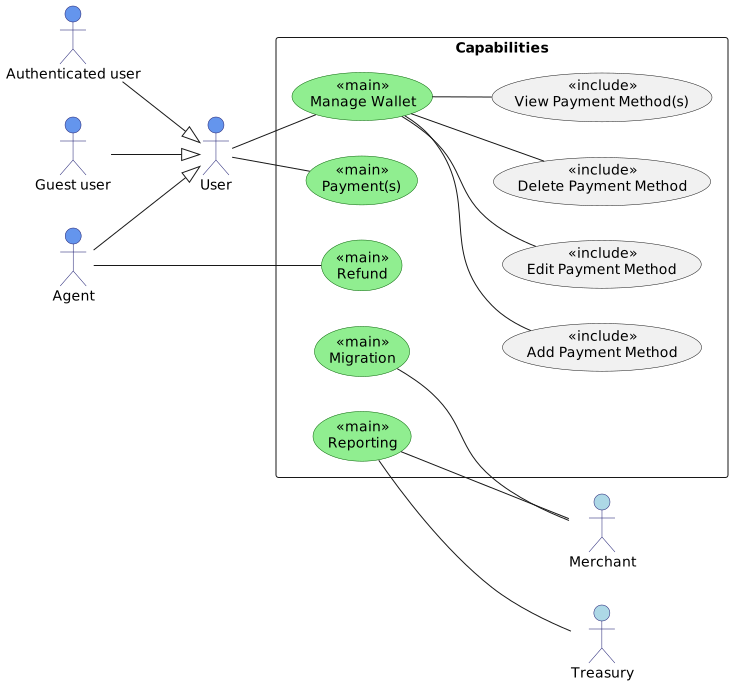
Plant UML code
' plantuml code
' Copy & paste this code block in https://www.planttext.com/

@startuml
left to right direction

' Define styles

skinparam usecase<<main>> {
  BackgroundColor LightGreen
  BorderColor DarkGreen
}

' Define styles for primary actors
skinparam actor {
    BackgroundColor CornflowerBlue
    BorderColor MidnightBlue
    Shape component
}

' Primary actors
actor User as user
actor "Authenticated user" as auth_user
actor "Guest user" as guest_user
actor Agent as agent

' Secondary actors
actor Merchant as merchant #LightBlue
actor Treasury as treasury_team #LightBlue

' Use cases
rectangle Capabilities {
  usecase "Payment(s)" as payments <<main>>
  usecase "Manage Wallet" as wallet <<main>>
  usecase "Add Payment Method" as add_payment_method <<include>>
  usecase "Edit Payment Method" as edit_payment_method <<include>>
  usecase "Delete Payment Method" as delete_payment_method <<include>>
  usecase "View Payment Method(s)" as view_payment_methods <<include>>
  usecase "Refund" as refunds <<main>>
  usecase "Reporting" as reporting <<main>>
  usecase "Migration" as migration <<main>>
}

' Generalization relationships
auth_user --|> user
guest_user --|> user
agent --|> user

' Associations between actors and use cases
user -- wallet
user -- payments
wallet -- add_payment_method
wallet -- edit_payment_method
wallet -- delete_payment_method
wallet -- view_payment_methods
agent -- refunds
reporting -- merchant
migration -- merchant
reporting -- treasury_team

@enduml
Interaction Methods
Widget
A plug-and-play UI component that can be embedded into your website or application. The widget handles the payment flow, user authentication, and UI, reducing development effort and PCI compliance scope.
Supported Widget Modes
| Widget Mode | User type supported | Supported Actions |
|---|---|---|
PAYMENT | authUser, agent | Payment: One Time Payment, Pay and Store |
PAYMENT | guestUser | Payment: One Time Guest Payment |
PAYMENT_WITH_WALLET | authUser, agent | Payment: Payment with stored payment method(s) Wallet Management: Add, Edit, Remove Payment Method |
PAYMENT_METHOD_ENTRY | authUser, agent | Wallet Management: Add Payment Method |
WALLET | authUser, agent | Wallet Management: Add, Edit, Remove Payment Method |
PAYMENT_METHOD_SELECT | authUser, agent | Wallet Management: Add Payment Method, Select Payment Method |
PAYMENT_METHOD_DISPLAY | authUser, agent | Wallet Management: Display Payment Method |
Visual Illustration
API
For businesses needing more control or custom experiences, CCG offers a comprehensive API. This allows you to build custom payment flows, manage wallets, and integrate advanced features.
API Access Levels
CCG's API supports multiple access levels to ensure security and proper segregation of duties:
| Access Level | Scope Name | Description | Supported Actions |
|---|---|---|---|
| Merchant Scope | merchant | Making Payments | Payment (with Stored Card, Capture, Cancel, Refund), Wallet Management (Edit, Remove Method) |
| Wallet Management | merchant-wallet-management | Managing Wallets (find, retrieve, manage digital wallets) | Wallet Management (Retrieve, Edit, Remove Payment Method) |
| PCI (Self Service) | merchant-pci | For PCI-compliant merchants handling sensitive card data directly | One Time Pay, Pay And Store, Add Payment Method |
Visual Illustration
Note: Access to certain API levels may require additional onboarding or compliance verification.
For more details on integration, see the Developer Guide and API Reference.