Payments
The Payments API is a RESTful API that enables merchants to process payments and manage the full payment lifecycle — from creation through capture, confirmation, and refund — without requiring the Convenient Checkout UI widget.
Supported payment methods:
| Method | Description |
|---|---|
| Credit / Debit Cards | Visa, Mastercard, Amex, Discover |
| HSA / FSA Cards | Health spending account cards |
| ACH | Bank account transfers |
| Apple Pay | Tokenized mobile wallet |
| Google Pay | Tokenized mobile wallet |
Payment Lifecycle
The diagram below illustrates payment state transitions from creation to completion:
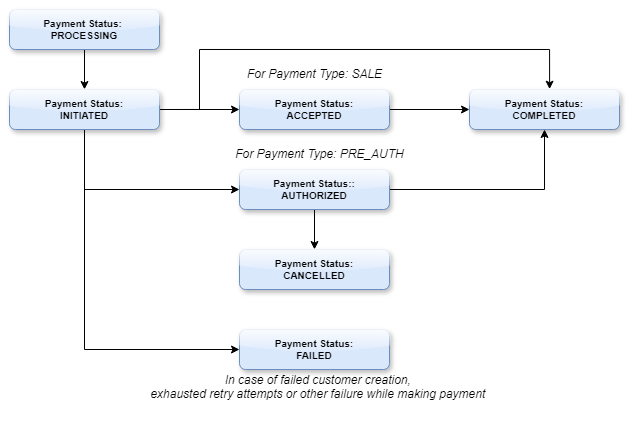
For a detailed state reference, see the Payment Lifecycle page.
Available Endpoints
| Operation | Method | Endpoint | Reference |
|---|---|---|---|
| Create Payment | POST | v2/payments | API Ref |
| Get Payment by ID | GET | v2/payments/{paymentId} | API Ref |
| Get by Merchant Txn ID | GET | v2/payments | API Ref |
| Capture Payment | PATCH | v2/payments/{paymentId}/capture | API Ref |
| Cancel Payment | PATCH | v2/payments/{paymentId}/cancel | API Ref |
| Confirm Allocation (3DS) | PATCH | v2/payments/{paymentId}/allocations/{allocationId}/confirm | User API Ref |
| Refund Payment | POST | v2/refunds | API Ref |
Create Payment returns HTTP 202 ACCEPTED immediately. The paymentId in the response is used for all subsequent operations. Poll or use webhooks to track final status.
Integration Flow
The typical server-to-server payment integration follows these steps:
1. POST v2/payments          → Receive paymentId (202 Accepted)
2. Receive webhook            → PAYMENT_SUCCEEDED / PAYMENT_FAILED
   — or —
   GET  v2/payments/{id}      → Poll for status
3. PATCH v2/payments/{id}/capture → (if auth-capture flow)
Step-by-step:
- Create Payment — Submit payment amount, customer details, and
PaymentMethodId. The API returns immediately with apaymentIdand initialstatus. - Track Status — Listen for webhook notifications (
PAYMENT_SUCCEEDED,PAYMENT_FAILED) or pollGET v2/payments/{paymentId}. - Capture (auth-capture only) — Call
PATCH captureonce goods/services are ready to be fulfilled. - Retrieve via Merchant Transaction ID — Use your own
merchantTransactionIdto look up a payment if thepaymentIdis unknown. ThemerchantTransactionIdis also returned in theGET /sessionsresponse.
Payment Types
Single Payment
Charge one card for the full transaction amount. Standard flow with no rollback logic.
✂️Split Tender
Split a transaction across multiple payment methods with automatic rollback on failure.
↩️Refunds
Full or partial refunds for single and split-tender payments.
🏥IIAS Payments
Inventory Information Approval System payments for HSA/FSA cards.
🔄Payment Lifecycle
Full state machine reference — all payment statuses and transitions.
⚖️Disputes
Handling chargebacks and dispute evidence submission.
💸Unlinked Refunds
Issue a direct credit to a card without referencing a prior payment — for goodwill credits or failed linked refunds.
FAQ
Q: Should I use webhooks or polling to track payment status?
Webhooks are strongly preferred — they provide near-real-time updates and reduce API load. Use polling as a fallback only if your infrastructure cannot receive webhooks.
Q: What happens if my server doesn't receive the webhook?
Poll GET v2/payments/{paymentId} with exponential backoff. Webhooks have a retry policy, but polling is a reliable safety net.
Q: Can I retry a failed payment with the same merchantTransactionId?
Yes, up to 5 times. After 5 attempts the ID is locked and a new one must be used.
Q: Can I use the Payments API alongside the CCG widget?
Yes. The widget handles the UI flow and creates a session; you use the Payments API for server-side operations like capture or refund after session completion.
Q: Where do I find the merchantTransactionId if I only have a session ID?
Call GET v2/sessions/{sessionId} — the payment details including merchantTransactionId are included in the session response.
Integration Checklist
- OAuth token obtained with
merchantscope -
PaymentMethodIdretrieved via wallet/session flow (no raw card numbers) -
merchantTransactionIdis unique per transaction - Webhook endpoint configured and verified for
PAYMENT_SUCCEEDED/PAYMENT_FAILEDevents - Fallback polling implemented for webhook delivery failures
- Error handling covers declined cards, duplicate IDs, and session expiry
- Tested in staging environment:
https://api-stg.uhg.com/api/financial/commerce/nonprodcheckout/ - Split-tender rollback behavior verified (if applicable)