Customer Session Translation
Overview
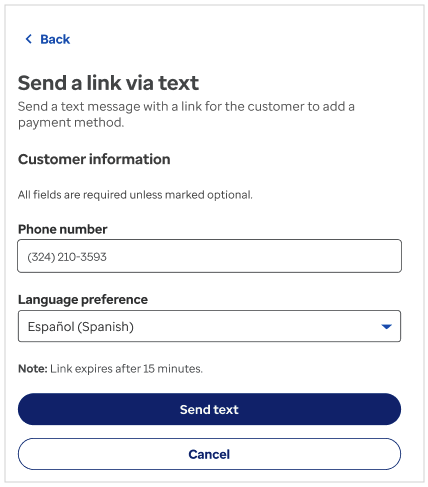
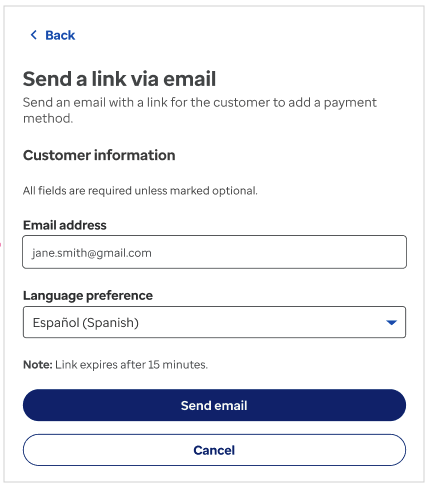
Agents can set a preferred display language for a customer's child session when initiating contact via SMS or email. When the customer opens the widget link, it launches in the language the agent selected.
This feature is available for the following agent-initiated journeys:
| Agent Experience | Text to Add | Email to Add | Text to Pay | Email to Pay |
|---|---|---|---|---|
| Language translation for child session | ✅ | ✅ | ✅ | ✅ |
note
Child sessions are only available within the Hosted experience.
How It Works
- The agent initiates a payment or wallet action and selects the customer's preferred language from the language dropdown.
- The system generates a link and sends it to the customer via text or email in that language.
- When the customer clicks the link, the CCG widget opens as a Hosted experience in the selected language.
- The customer can still update their own language preference using the dropdown in the widget header.
Step 1 — Agent selects language and sends the link:
Step 2 — Customer opens the widget in the selected language:

API Configuration
The preferred language is set by the agent at session creation time via the preferredLanguage field in the session request.
Refer to the Sessions API documentation for the full request schema.
Scope & Limitations
The following are outside the scope of child session translation:
- API responses from CCG or Stripe — merchants are responsible for translating these.
- Name and Nickname values entered by customers will not be translated.
- Privacy Policy — provide your own translated version. See Optum Privacy Policy.
- ACH mandate, ACH Consent Text, NPS survey/questionnaire
- Text and Email to Add — future feature
- Terms and Conditions — check with legal for translation requirements.
Related Documentation
- Localization — Language config, supported languages, and language selector dropdown
- Widget Capabilities
- Sessions API
- API Reference